Skip to main content
Warehouse Management System
Start Free
Menu
About
Benefits
FAQs
WP Plugin
Sign in
Start Free
Home
»
Knowledge Base
» How to manually create Invoice
How to manually create Invoice
by
WMS Admin
, June 26, 2023
##Dashboard
##Dashboard Page
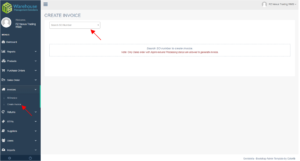
Click “Invoices” from your dashboard sidebar and choose “Create Invoice” from the dropdown. You will then be redirected to the Create Invoice page.
Search Sales Order Number on the search bar.
Hit Enter to automatically create a new Invoice.
Scroll to Top